Showing posts with label Google. Show all posts

How Map APIs Power the Future of AI

Artificial intelligence and location technology are merging in powerful ways. As large language models (LLMs) like ChatGPT, Gemini, and Claude gain capabilities to interact with the physical world, Map APIs are becoming the invisible backbone of spatial intelligence. These tools enable AI systems to understand geography, movement, and human context — transforming how we navigate, communicate, and make decisions.

Why Maps Matter in Artificial Intelligence

AI systems are no longer confined to text or images. They now interpret the world around us — and location data plays a crucial role. Whether it’s a virtual assistant recommending restaurants, an autonomous vehicle predicting traffic, or an emergency app routing responders to a wildfire, geospatial APIs provide the framework that connects digital reasoning to real-world geography. This link between AI reasoning and location context is what makes AI truly useful in everyday life.

What Are Map APIs?

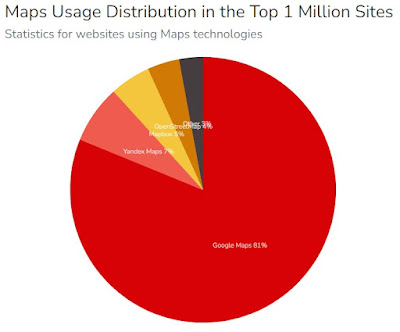
A Map API (Application Programming Interface) lets developers access and display mapping data within apps, websites, or software. APIs like Google Maps Platform, Mapbox, and OpenStreetMap allow users to fetch layers of roads, buildings, satellite imagery, and points of interest. In the context of AI, these APIs become the spatial data layer that powers smart decisions, predictions, and real-time actions.

Mapbox’s Vision: Closing AI’s “Where” Gap

In the video above, Mapbox’s Kieran McCann argues that AI models are very good at “what” and “how,” but struggle with “where.” For example, an LLM might know about museums, restaurants, or weather patterns — but without spatial context, it can’t reliably tell you which one is closest. Mapbox is positioning itself to fill that gap by providing the geospatial framework that translates AI reasoning into location-aware answers.

McCann emphasizes how Mapbox’s internal mapping infrastructure, vector tile services, and real-time updates allow AI systems to answer queries like “Find me the nearest hospital with open beds” or “Route me away from air pollution zones.” This vision frames Mapbox not just as a map provider, but as a core enabler of AI’s spatial intelligence.

The Rise of Spatially Aware AI

Modern AI agents are increasingly expected to “know where they are.” For example, when a chatbot answers questions like “What’s the nearest EV charger?” or “Which route avoids traffic jams right now?”, it uses a map API behind the scenes. These spatial capabilities can transform industries:

  • Retail & Logistics: AI predicts delivery times and optimizes routes.
  • Energy & Environment: AI forecasts solar production or detects methane leaks using geospatial layers from tools like SolarEnergyMaps.com and DrillingMaps.com.
  • Public Safety: Systems analyze patterns of traffic violations or speed camera data from PhotoEnforced.com to prevent accidents.
  • Urban Planning: AI evaluates zoning, air quality, or population density for city planning.

How Map APIs Integrate With AI Models

Integrating mapping data with AI involves layering structured geospatial information on top of unstructured text or image inputs. Here’s how it typically works:

  1. Data Retrieval: An AI requests location-based data from a map API, such as coordinates, boundaries, or routes.
  2. Context Understanding: The LLM interprets this data to answer user queries or make predictions.
  3. Action Execution: The model may return a map visualization, generate a route, or issue a command to another API.

These workflows allow AI systems to interact with the real world. For instance, a voice assistant could use Google Maps’ Directions API and an OpenWeather API simultaneously to suggest “the fastest route home avoiding rain.”

Popular Map APIs for AI Developers

Map APIs

Choosing the right Map API depends on accuracy, customization, and cost. Below is a quick comparison of popular options:

API ProviderBest ForKey FeaturesExample Use Case
Google Maps PlatformEnterprise AI & chatbotsStreet View, geocoding, places, routesAI assistants and smart navigation
MapboxAI + spatial contextVector tiles, real-time map updates, custom stylingFilling the “where” gap for LLMs
OpenStreetMap (OSM)Open-source projectsCommunity data, editable layersEnvironmental monitoring & research
HERE TechnologiesAutomotive & IoTReal-time traffic, sensor integrationAutonomous vehicles & logistics
Esri ArcGISProfessional GIS analyticsSpatial modeling, heatmaps, 3D scenesInfrastructure planning & policy modeling

Real-World Applications: Map + AI = Smarter Decisions

The combination of AI and map APIs is transforming industries across the board:

1. AI Navigation Assistants

Apps like Google Assistant, Siri, and ChatGPT are beginning to integrate real-time mapping to provide navigation help. Instead of just describing directions, AI can visualize them on a map, estimate time of arrival, and even suggest safer or cheaper routes.

2. Autonomous Driving

Self-driving cars rely on centimeter-accurate maps layered with AI sensor fusion. APIs from HERE, TomTom, and Google provide constant updates that LLMs or driving AIs interpret to make split-second steering and braking decisions.

3. Environmental Intelligence

Platforms like RefineryMaps.com and SickBuildingsMap.com collect user-generated environmental data. AI can analyze these inputs, identify pollution clusters, and forecast health impacts — combining crowdsourced maps with predictive analytics.

4. Real Estate & Insurance

AI-driven valuation tools use mapping APIs to factor in proximity to schools, highways, or hazards. Insurance companies assess flood zones or fire risk automatically using geospatial datasets from government and satellite APIs.

5. Humanitarian & Crisis Response

In disaster relief scenarios, AI-powered maps guide rescue operations. By merging weather forecasts, population density, and traffic data, responders can find the fastest safe routes — a crucial function in wildfires, hurricanes, or earthquakes.

How AI Agents Use Spatial Data

Large language models are evolving into “AI agents” that can perform real-world tasks. With map APIs, these agents gain spatial intelligence — the ability to interpret and act upon location-based information. Examples include:

  • Chatbots that summarize environmental conditions for any city.
  • AI assistants that detect speed cameras or school zones using open datasets.
  • Customer support bots that display local outage maps or service areas.
  • AI travel planners that generate itineraries with embedded maps and travel times.

Spatial data turns generic AI responses into context-aware experiences. It bridges the gap between global intelligence and local relevance.

Challenges and Privacy Concerns

While map APIs empower AI, they also raise ethical questions. Accessing location data introduces privacy risks if users aren’t aware their coordinates are being tracked or stored. Developers must follow principles like:

  • Transparency: Always disclose data use and request consent.
  • Anonymization: Strip identifiable information before analysis.
  • Data Minimization: Store only what’s needed to provide a service.
  • Opt-Out Controls: Allow users to delete or disable location tracking.

Regulations such as GDPR and California’s CCPA set legal frameworks for these practices. Future map-based AI systems will need privacy-first architectures that balance convenience and control.

The Future of Mapping APIs in AI

By 2030, experts expect nearly every digital product to have a spatial layer. As AI agents, smart glasses, and autonomous drones proliferate, maps will become the primary interface between digital systems and the physical world. We may see:

  • Dynamic Real-Time Maps: Constantly updated by sensors and user inputs.
  • Predictive Maps: Showing not just current conditions but future probabilities — for traffic, pollution, or energy demand.
  • 3D and Indoor Mapping: Essential for robotics and augmented reality.
  • Decentralized Map Networks: Using blockchain or crowdsourced verification to maintain map integrity.

These trends point toward a future where every AI model is also a map reader — interpreting and generating spatial data as easily as it handles text.

Integrating Your Own Map Data Into AI Systems

For developers and researchers, connecting custom datasets to AI tools is easier than ever. You can use APIs from the Syndicated Maps Network to embed data from over 20 niche mapping platforms, including environmental hazards, cell dead zones, and traffic cameras. These datasets enrich AI projects with real-world context and can be queried by LLMs using structured prompts such as “Show me all refinery incidents within 5 miles of schools.”

Combining proprietary maps with open AI models creates unique insights — helping startups and researchers stand out in a crowded market.

Conclusion: The New Geography of Intelligence

As AI becomes our co-pilot in life, it needs a map. Map APIs are not just visualization tools — they are the scaffolding of spatial awareness. They allow machines to think locally, act contextually, and predict outcomes in ways that pure language models cannot. The next era of AI will be geographic by nature, fueled by real-time data, satellite imagery, and crowdsourced maps that mirror our living planet.

To explore real-world examples of how mapping data drives innovation, visit SyndicatedMaps.com and discover a network of crowdsourced mapping projects designed to make data more open, transparent, and actionable.

Why Google Maps Doesn't Show You Unsafe Areas

Google Maps has become the default navigation tool for millions of drivers, cyclists, and pedestrians around the world. While it excels at finding the fastest route, avoiding tolls, and rerouting around traffic jams, one thing it does not do is warn you about unsafe neighborhoods or crime hotspots. This leaves many users asking: why doesn’t Google Maps include safety alerts? 

Google Reader Manager Subscription Bundles (Product IDs) — How to Use

📦 Google Reader Manager Subscription Bundles — How to Tag Your Content with Product IDs

Google has made it easier for publishers to manage premium content using Reader Manager inside the Google Publisher Center. If you're offering subscription-based access to your content, the Product ID system is the key to unlocking and organizing what your paying readers see.

By using Product IDs, you can associate content across your website with specific subscription plans. Anyone who subscribes to a given bundle can instantly access any article, video, or page tagged with the corresponding Product ID. Think of it like tagging content behind a digital paywall — but Google does the heavy lifting to authenticate access for you.

🔑 How Product IDs Work

To link your content to a specific subscription plan in Reader Manager, all you need to do is:

  1. Create or edit a subscription bundle in Google Reader Manager.

  2. Assign one or more Product IDs to that bundle (e.g., SPORTS2025, PREMIUMNEWS, or LOCAL-EXCLUSIVE).

  3. Use those same Product IDs to tag your premium content in your CMS or backend system.

When a reader subscribes, Google checks the plan’s Product IDs and automatically grants access to all matching content.

✅ Why Use Product IDs?

Using Product IDs gives you complete flexibility to:

  • Bundle related topics (e.g., all investigative journalism under one plan).

  • Create tiered access levels (e.g., basic, premium, VIP).

  • Quickly add or remove content from plans just by updating tags.

  • Manage subscriptions across multiple publications or microsites.

You don’t need to maintain complex membership databases. Google handles it through Reader Manager and your tagged metadata.

📰 Example Use Case

Suppose you run a publication that covers three premium areas:

  • Local Politics – tagged with GOVT-ACCESS

  • Crime Reports – tagged with CRIME-INSIDER

  • In-Depth Features – tagged with LONGFORM2025

You can create a bundled plan called “City Deep Dive” and link all three Product IDs to that plan. Readers who subscribe to this plan through Google will get instant access to everything tagged with those IDs, no matter when it was published.

⚙️ How to Set It Up

  1. Go to your Google Publisher Center.

  2. Click on your publication, then navigate to Reader Revenue > Manage Subscriptions.

  3. Create a Subscription Plan, choose a name, price, and duration.

  4. Add the Product IDs that correspond to your premium content.

  5. Save and publish. That’s it.

Now make sure your articles include metadata or tagging in the backend that aligns with those Product IDs.

🔧 Pro Tip

Use structured data to help Google crawl and verify your Product ID associations. You can also tag article markup with the productID field to ensure smooth integration.

📚 Additional Resources

🧠 Here Is A Use Case Example Below 

If you're a digital publisher or content creator with premium material, this is a no-brainer. Product IDs are the simplest way to give your readers access to the content they paid for — and Google’s system does the gatekeeping.

Have multiple sites or publications? Product IDs make it easy to bundle cross-platform content into one seamless subscription.

Need help tagging your content correctly or setting up your subscription bundles? See our example below . . .

📍 Syndicated Maps $9.95 Monthly Subscription Bundle for 22 Interactive Maps

Syndicated Maps has officially launched a new all-access subscription bundle priced at just $9.95/month, giving users unlimited access to 22 highly specialized maps—each focused on solving real-world location-based problems. Previously, each map was available à la carte for $1/month, making this bundled plan a savings of over 50%.

With over 10 years of crowdsourced geospatial data and millions of annual users, Syndicated Maps continues to lead the way in hyperlocal intelligence for consumers, researchers, journalists, and activists alike.

🌐 What’s Included in the Subscription Bundle?

The $9.95/month plan gives subscribers full access to the following 22 interactive maps:

  • 🚦 Photo Enforced Map – Red light and speed camera locations

  • 📶 Dead Cell Zones – Cell phone dead zone reports

  • 🚧 Bad Intersections Map – Hazardous intersection tracker

  • 🛢️ Drilling Maps – Oil and gas well locations

  • ☀️ Solar Energy Maps – Solar infrastructure data

  • 🏭 Refinery Maps – U.S. refinery facility locations

  • Power Plant Maps – Power generation sites (coal, nuclear, solar)

  • 🏫 Dangerous Schools – Risky and underperforming schools

  • 🆘 Disaster Relief Maps – Emergency routes and FEMA zones

  • 🏢 Sick Buildings Map – Buildings linked to health complaints

  • 🚿 Smelly Rooms Map – Hotels with cleanliness or odor complaints

  • 🏕️ Homeless Maps – Encampments and service areas

  • 🏕️ Campground Maps – Free and paid camping spot finder

  • 🏒 Hockey Map – Ice rinks across North America and Europe

  • 🏟️ Stadium Maps – Pro & college stadium locations

  • 🎤 Concert Tour Maps – Artist tour stops by venue

  • 🎭 Theater Maps – Live performance venue finder

  • 🛥️ Boat Slip Maps – Dock and mooring locations

  • ❄️ DIY Ice Baths – Cold plunge recovery spots

  • 🔫 Gun Safety Map – Community-based gun safety resources

  • 🍞 The Bread Hunter – Bakery & artisan bread map

📊 Why Subscribe to the Syndicated Maps Bundle?

Rather than subscribing to maps one by one, this all-in-one plan gives users access to the entire ecosystem of location-based data tools. It's perfect for:

  • Drivers checking camera zones or crash hotspots

  • Hikers and RVers looking for safe, remote campsites

  • Homeowners monitoring nearby drilling or refinery activity

  • Researchers and journalists using real-time environmental data

  • Parents evaluating school safety and community conditions

This subscription is not only a money-saver—it also supports independent, ad-free map development and a community-first model for reporting and verifying data.

🔗 How to Subscribe

Getting started is simple:

👉 Visit the official blog post at blog.syndicatedmaps.com
👉 Click Subscribe and choose the $9.95/month bundle
👉 Get instant access to all 22 interactive maps

Subscribers receive:

  • Unlimited monthly access

  • Ongoing map updates

  • Tools for submitting reports

  • Early access to new maps and features

🚀 The Future of Crowdsourced Location Intelligence

Syndicated Maps is building a next-generation mapping network where real users contribute real insights. With trust in big data platforms fading, the power of user-driven, transparent mapping is more important than ever.

This $9.95 monthly bundle marks a shift toward affordable, community-powered access to essential location data—available on mobile and desktop, no app required.

🗺️ Join the map movement. Subscribe today and explore your world with fresh insight:
👉 Subscribe to the Syndicated Maps Bundle

Why News Site Traffic is Declining – and Why Local Reporting is the Solution

In July 2025, nearly every major U.S. news site saw traffic drop—some in the double digits. SimilarWeb data via Press Gazette revealed that 44 out of the top 50 U.S. news websites lost visitors year-over-year. From paywalls to AI summaries replacing click-throughs, the digital news industry is facing one of its toughest moments. But there is a clear path forward: doing more meaningful local reporting.

The Data Behind the Decline 

8 Simple Credit Card Fraud Fixes Banks Won’t Use

Credit card fraud costs Americans billions every year. Yet major banks and card issuers continue to ignore common-sense solutions that could dramatically reduce fraud—many of which are already available.

From mobile wallets like Apple Pay and Google Wallet to real-time purchase approvals, here are seven ways to prevent credit card fraud that banks could implement today—but choose not to.

What is Google Reader Revenue Manager and How Does It Work?

In the evolving landscape of digital media, publishers are constantly seeking innovative ways to monetize their content. One such tool that has garnered significant attention is Google's Reader Revenue Manager. This comprehensive guide will delve into what Google Reader Revenue Manager is and how it works, helping you understand its potential to boost your revenue streams.

What is Google Reader Revenue Manager?

Why Do Some Google Ads Look Like Spyware?

In the digital age, advertisements are ubiquitous, appearing on almost every website we visit. Google Ads, one of the most popular online advertising platforms, plays a significant role in this landscape. However, a recurring issue for many users is that some Google ads can look alarmingly similar to spyware. This perception arises from a combination of factors, including ad design, deceptive tactics, and the nature of the advertised content. Let’s explore these factors in detail to understand why some Google ads resemble spyware.

Navigating the Competition: Google Maps and Its Rivals

In the ever-evolving landscape of digital navigation, Google Maps has long reigned supreme as the go-to choice for millions of users worldwide. However, the competition in this space is heating up, with several players vying for a piece of the pie. Let's take a closer look at the current and potential future competitors of Google Maps. 

The Mystery Behind Google Maps' Black Smudge: A Look into its Disappearance

Google Maps, a powerful tool for navigation and exploration, has evolved significantly over the years. However, prior to 2012, keen-eyed users might have noticed something peculiar – certain areas on the map were concealed by a big black smudge. This censorship raised questions about why these areas were hidden and what led to their eventual disappearance. Let's delve into the intriguing history behind this phenomenon.

The Purpose of the Black Smudge 

Google Wants to Sell Public Safety Data and Expects $100M In Revenue


CNBC's Jen Elias joins 'Closing Bell Overtime' with news that Google will start selling Maps data to solar energy companies.

Google is gearing up to sell its mapping data to companies involved in solar product development, with the aim of generating an anticipated $100 million in its inaugural year, according to insider sources reported by CNBC.

Google News Showcase Is Awesome!

Google News Showcase - Syndicated Maps

We recommend following the news sources you trust.   All Syndicated Maps news sources can be followed by visiting our individual blogs and then following each blog as a source.  

Why does AdSense approval take so long? - I Asked ChatGPT

AdSense approval

The length of time it takes for AdSense approval can vary depending on several factors. While I don't have access to real-time information, I can provide some general reasons why AdSense approval may take longer:

Top 10 Reasons Why Large Companies & Government Fail at Crowdsourcing Data

Why Do Big Companies Fear Using Crowdsourced Data?

We have been crowdsourcing map data for over 15 years, long before the term "crowdsourcing" was coined by an article in 2006.  The more I speak with large companies about crowdsourced data the more I begin to understand why most large companies and governments fail at collecting and using crowdsourced data for their benefit.

Google Ad Manager Will Make Publishers More Money

Publishers Money

Google Ad Manager is a comprehensive ad management platform that provides publishers with tools to monetize their digital content effectively. While using Google Ad Manager can potentially help publishers generate more revenue, several factors contribute to the overall financial success of publishers using the platform:

Could Google Become The Next Wireless Giant?

Google-Fi

Google already has a significant presence in the wireless industry through its subsidiary, Google Fi. Google Fi is a mobile virtual network operator (MVNO) that provides wireless services to customers by leveraging the infrastructure of major cellular networks such as T-Mobile, Sprint (now part of T-Mobile), and US Cellular.

Popular Articles (All Time)